WeChat is firing back at rumors that its built-in AI assistant, Xiaowei, “reads chat logs directly” and “snoops on your privacy.”
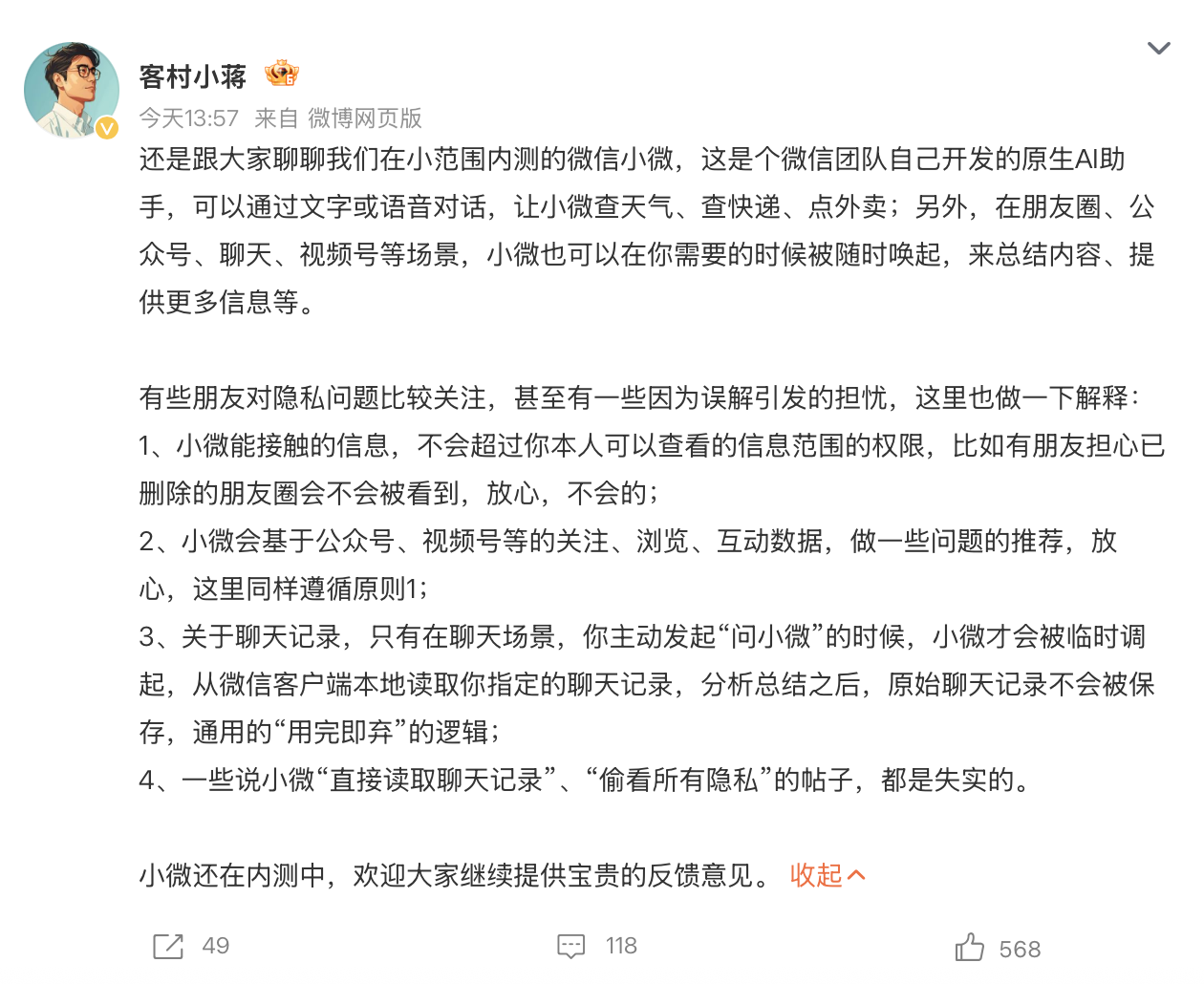
On Sept. 15, WeChat employee “Ke Cun Xiao Jiang” explained in a social media post that Xiaowei is a native AI assistant built by the WeChat team. You can talk to it by text or voice to check the weather, track a package, or order takeout. It can also pop up when you need it inside Moments, Official Accounts, chats, Channels, and other places to sum things up or give you more info.
On privacy, he put it simply: “Xiaowei can’t touch anything beyond what you yourself are allowed to see. Some people worry that deleted Moments posts might still be visible—don’t worry, they won’t be.” “Xiaowei may recommend things based on your follows, browsing, and interactions with Official Accounts, Channels, and similar sources. Same rule applies here.”
As for chats, he said: “Only when you’re in a chat and actively tap ‘Ask Xiaowei’ will Xiaowei be temporarily brought in. It reads the chat records you point to from the local WeChat client. After it analyzes and summarizes them, the original records aren’t saved. It’s a simple ‘use it and throw it away’ approach.” He added, that posts saying Xiaowei “directly reads chat logs” and “snoops on all your private data” are simply false.
When a reporter asked Tencent customer service about the privacy concerns, a staff member told NUPIAO: “You can relax about the privacy worries you have. Xiaowei won’t peek at your chats. It only reads recent local info when you actively summon it—say, asking Xiaowei to summarize a chat. It’s used only for that one answer, and it’s not saved or used for training.”

The customer service rep also said that if you don’t want it to remember info, you can tap “Xiaowei > the ‘…’ in the top right > Settings > Memory and Privacy > Memory” to turn it off.
WeChat’s native AI assistant, Xiaowei, first started a small beta test on June 20. Users with beta access can update WeChat to the latest version (8.0.75), then tap the “Xiaowei” icon in the upper-left corner of the main screen to use the AI features. You can also swipe right from the main screen to start chatting with Xiaowei.
Xiaowei currently runs on multiple AI models, including Tencent’s own models and solid open-source ones. Based on Xiaowei’s own introduction, its main model is WeLM, a Chinese large language model built by the WeChat team, while some answers come from DeepSeek.
The feature works through text or voice. It can help you handle native WeChat functions—adjusting settings, sending messages, managing Moments, and so on—and quickly launch mini programs to get things done, like booking a doctor’s appointment or buying coffee. It can also search for related content or generate images.
NUPIAO got hands-on with it right away. Once you’re inside Xiaowei, you can use text or voice to handle basic tasks, including everyday chat, reading files, setting reminders, sending messages, transferring money, and managing Moments. Examples include “Say happy birthday to Mom,” “Transfer money to XXX,” “Pull the highlights from my Moments over the past two days,” and “Remind me to drink water in five minutes.”
Beyond basic tasks, one cool part of Xiaowei is that it can call mini programs to complete services. Say you want a cup of Hey Tea and tell it the sugar and ice level—it will automatically open the Hey Tea mini program or the Meituan Waimai mini program (you can choose which one) to place the order. You just confirm payment yourself. Booking a hotel, hailing a taxi, and similar tasks work the same way.
Earlier this month, WeChat was reported to be beta-testing a “Xiaowei AI social” feature. Your Xiaowei can directly find a friend’s Xiaowei and start a conversation. You just tell your own Xiaowei what you want, and it goes to the other person’s Xiaowei to talk it over. After the other person confirms, the two Xiaoweis chat first and bring the result back. If a decision is needed along the way, you’ll be asked to confirm.
Unlike “sending a WeChat message for you,” this feature lets the two AIs talk first, with users stepping in only for authorization and decisions. In NUPIAO’s hands-on test, “Xiaowei AI social” content didn’t show up in personal chat windows—it stayed inside Xiaowei.
On Sept. 15, hands-on testing by Xinhuanghe Dayu Finance reporters found that the grayscale test for WeChat’s native AI assistant Xiaowei has reached the PC version. On desktop, it’s getting more involved in searching and handling files, web pages, and WeChat content. Its use cases are also stretching from life services and instant messaging into desktop office work.
Tencent President Martin Lau talked about feedback from the Q2 2026 WeChat AI Xiaowei grayscale test on the earnings call. He said AI can make WeChat smarter, helping users make transactions, explore content, and manage daily life. In the PC era, QQ was mainly a communication and social tool. In the mobile internet era, WeChat multiplied QQ’s value by more than ten times. Now, in the AI era, WeChat will become an AI-first ecosystem over time. Users give an instruction, and the system executes it on its own.
He said that if Tencent can deliver that experience while keeping costs under control and meeting user privacy needs and cost efficiency, it can give WeChat serious power. “In the future, WeChat’s ecosystem will expand, and the current profit mechanism will translate into huge value. That’s the future we see. As the prototype rolls out, we’re becoming more and more confident.”
He also noted that in the past, interaction in the WeChat ecosystem was mostly between users and content or mini programs. In the future, users will be able to send complex instructions straight to an Agent, which will help carry out various tasks. Longer term, mini programs, merchants, and every user will have their own dedicated Agent, and those Agents can communicate with each other and complete transactions. Tencent is building the underlying architecture step by step.